Site · E-commerce
Aldermark 3D watch product page with configurator
A live 3D watch showing your real time, an exploded view on scroll and a configurator with live price, drawn as an engineering sheet.
What's in the prompt
- A full written spec: layout, tokens, every animation with its numbers, responsive rules
- The complete working code as the reference implementation
- Accessibility, reduced motion and fallbacks already handled
- A “Make it yours” checklist so your site looks like nobody else’s
- Type
- Site
- Built with
- HTML, CSS, JS · three.js 0.170.0
- Prompt size
- 137 KB
- Tags
- product page, three.js, configurator, e-commerce
- Updated
- 2026-11-26
Use it in three steps
- Copy the prompt with the button above.
- Paste it into your AI (Claude, Claude Code, ChatGPT, Cursor…) and add your edits.
- Launch the single
index.htmlanywhere: Cloudflare Pages, Netlify, GitHub Pages.
About the Aldermark design
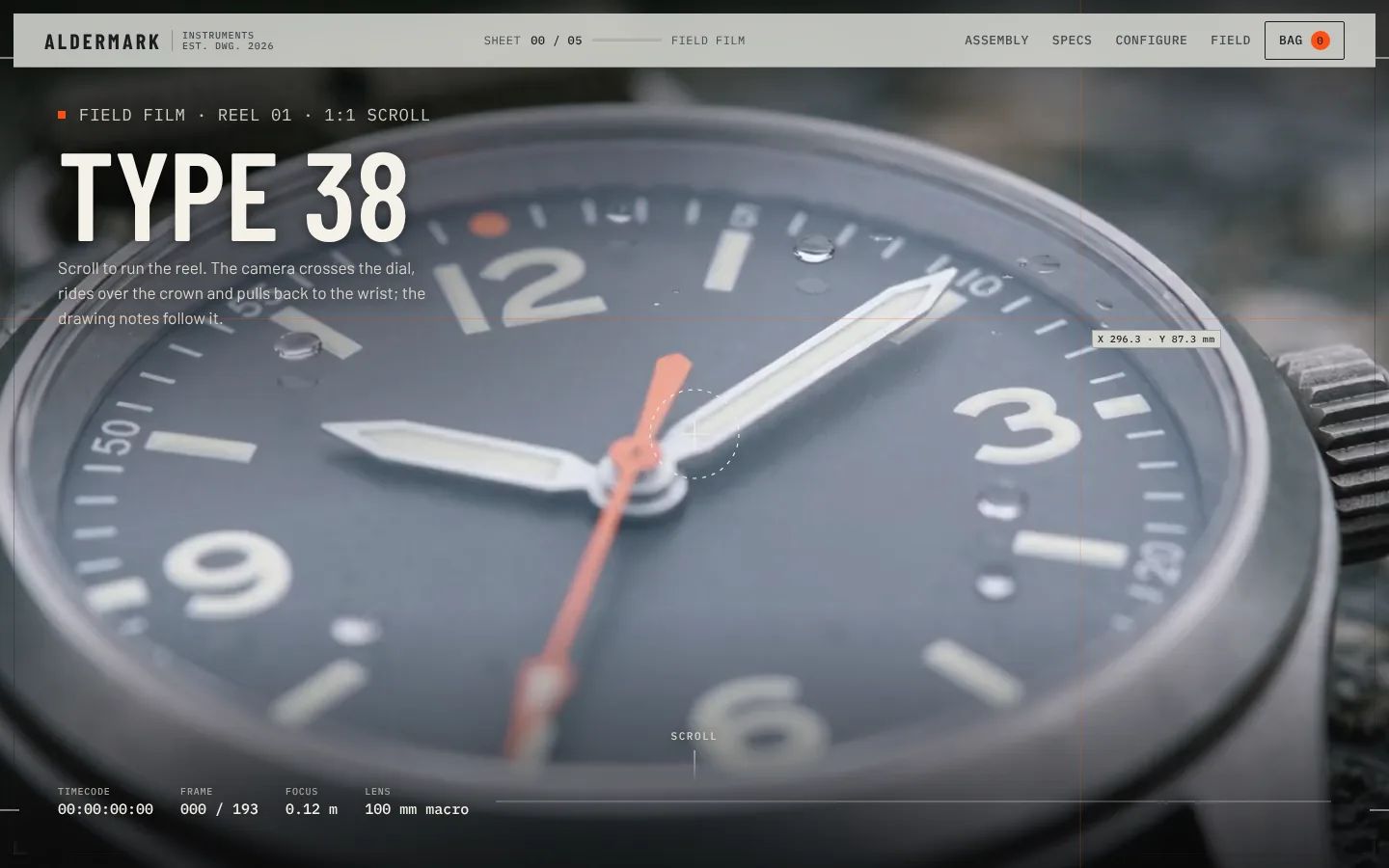
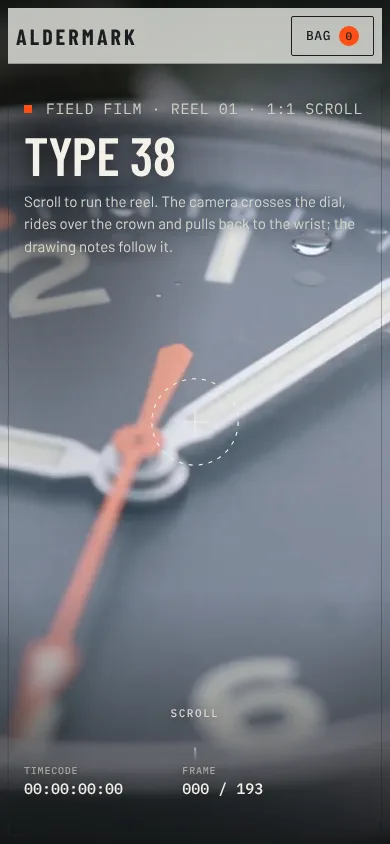
Aldermark Type 38 is a product page for a fictional 38 mm automatic field watch, designed as a technical drawing. The ground is instrument-grey paper with a fine graph grid, a drawing frame with corner marks and a title block for the footer, and the only colour is a safety orange for marks and the main button. Barlow Condensed in capitals sets the headlines like drawing notes, Barlow the body and IBM Plex Mono every figure. The watch is built in three.js from code and its hands show the visitor's real local time, ticking eight beats a second. That suits a product sold on precision and measured specs.
A plotter preloader draws the watch outline, then the hero shows the watch inside live dimension lines next to the headline and a readout of local time. Scrolling moves the same watch into a pinned assembly view where it explodes along its axis into seven labelled parts with leader lines, then turns side-on beside a ten-row specification table, then lands in a configurator for case finish, dial, strap and caseback engraving with a live price and code. Its straps lag each turn on their own spring. A drafting crosshair follows the cursor with a millimetre readout, and the bag, field photos and service FAQ complete the page.
Good for
- Watch and jewellery brands: the configurator handles finishes and engraving
- Camera lens or optics makers: the prompt suggests elements exploding along the optical axis
- Kitchen tools and grinders: lathe-turned objects suit the procedural build
- Bike and outdoor hardware: the spec table carries measured tolerances
- Engineering-led product launches: the drawing language signals precision
How Aldermark is built
- One watch travelling between screens. A single fixed canvas moves the watch between four [data-slot] elements, lerping its screen centre between their live getBoundingClientRect centres and blending pose, scale and explode with smoothstep across each scroll gap.
- Exploded view along the axis. In a 320vh pinned section, seven parts separate along the watch axis (crystal 2.35 down to caseback −1.7) while elbowed SVG leader lines draw from each part's projected anchor to its numbered callout, and a readout shows e × 24.0 mm.
- Real local time at 8 beats per second. The seconds hand uses s + floor(ms/125)/8 to mimic a 28,800 vph movement, the rotor spins faster as the turntable spring moves, and the balance wheel oscillates at 4 Hz.
- Underdamped strap lag. A second spring (k 26, damping ratio .32) chases the head's yaw and pitch, and the clamped difference rotates each strap about its lug bar, so straps overshoot and settle after every turn.
- Configurator that redraws textures. Case finish, dial and strap radios change materials and redraw the dial and strap canvases, and caseback engraving (max 18 characters, +$45) redraws the caseback canvas live.
Images, video and 3D
The watch has no asset file: it is built from lathe profiles and canvas textures. The page uses four photos under 250 KB each: three field shots of the watch in use and one Blender Cycles studio render. Reshoot or AI-generate field photos in one consistent grade, and render your own studio plate in Blender from the same profiles if you change the object.
Build it with Claude
Ask Claude for the full index.html and check the configurator in the preview: switching to Black DLC should add $180, the config code should read like AM38-ST-GR-CV, and engraving text should upper-case itself. If WebGL is unavailable there, the SVG technical drawing with live hands should fill every slot.
Claude guide →Build it with Claude Code
Create index.html with assets/field-rain.webp, field-ridge.webp, field-map.webp and studio-plate.webp, and serve it with python3 -m http.server. Ask Claude Code to confirm the hands match the local clock, that the watch lands centred in each slot at 390 and 1440 while scrolling, and that blocking the CDN triggers html.no-gl and the preloader still lifts.
Build it with ChatGPT
Ask ChatGPT to split the work into the UI script (travel ranges, configurator, bag, preloader, drafting cursor) and the three.js module (watch geometry, materials, springs), or to use canvas. A common follow-up is the slot travel: check that it reads live slot rects every frame and handles sticky parents with hold ranges rather than fixed scroll offsets.
ChatGPT guide →If it doesn’t work
- The watch drifts off its slot when sections are sticky: compute hold ranges from the sticky parent's top and bottom minus the sticky height, not from the slot's document position alone.
- Leader lines point at empty space after a resize: project each part's 3D anchor to the screen every frame and redraw the elbowed paths from those points.
- The preloader hangs when WebGL fails: the SVG fallback must also fire the am-ready event, and the 8000ms patience limit should lift the curtain regardless.
Questions about Aldermark
Does the Aldermark watch use a 3D model from an image-to-3D tool?
No. The prompt builds the watch in three.js from lathe profiles, primitives and canvas textures, because the hands must move, the parts must separate and the materials must change with the configurator. The live demo also adds a short scroll film section before the drawing.
What time do the hands show?
The visitor's real local time, with the seconds hand ticking eight times per second. Under reduced motion it ticks once per second and the balance wheel and rotor stop.
Make it yours
This prompt rebuilds one exact design. If everyone ships it unchanged, the sites will look alike. Before you paste it, change these lines so the result is yours. Each change is one edit to the prompt; the structure and the interactions stay intact.
- Brand and product. Swap "Aldermark Type 38" for your own instrument and price. Keep one hero object, seven named parts for the exploded view and 8–12 spec rows, so the assembly column and the table still balance.
- The travelling object. The procedural watch is the signature. Rebuild it as another round, layered object you can turn on a lathe: a camera lens (glass elements explode along the optical axis), a pepper mill, a bike hub, a coffee grinder burr set, a compass. Keep the lathe profiles, the exploded offsets along one axis, the leader-line callouts and the live element (the hands): a lens could show live focus distance, a compass the visitor's heading.
- The drawing language. Re-theme the paper: blueprint (
#1d3557ground, white linework, signal#ffd166), vellum (warm#ece6d6, sepia ink), or a dark CAD screen (#14171a, green grid). Keep body text ≥ 4.5:1 on the ground and the signal colour for marks only. - Type pairing. Swap Barlow Condensed / Barlow / IBM Plex Mono for another condensed grotesk + text face + mono, for example Saira Condensed + Inter Tight + JetBrains Mono, or Oswald + Source Sans 3 + Space Mono. Keep the uppercase condensed display.
- Configurator options. Replace finish, dial and strap with your product's three real choices and their prices. Keep three options per group, the live code string and the engraving field (or another text personalisation that redraws a texture).
- Imagery. Regenerate the field photos as your product in use, all with one lens, one light and one grade (overcast, muted, 35 mm documentary). Render one studio plate of the real object in Blender/Cycles from your own profiles rather than using AI for the hero object.
- The opening reel. Shoot or generate one continuous 8–10 s macro move over your own product: no cuts, the start frame being your best macro still. Re-place the five HUD callouts on its real features with their source-frame coordinates and progress windows, and keep the timecode/frame/focus bar.
- Copy voice. Rewrite every heading as a drawing note: short, factual and measurable ("Tolerances, not adjectives."). Replace the FAQ with the five questions your customers actually ask before buying.
Tell your AI: "Build exactly as specified, but with these changes: …", then list your edits.