Site · Landing page
Halm Bakery landing page with a live oven clock
A sourdough bakery and bake school whose hero is a clock of today's bake, with a working shop, bread-box builder, class booking and map.
What's in the prompt
- A full written spec: layout, tokens, every animation with its numbers, responsive rules
- The complete working code as the reference implementation
- Accessibility, reduced motion and fallbacks already handled
- A “Make it yours” checklist so your site looks like nobody else’s
- Type
- Site
- Built with
- HTML, CSS, JS · three.js 0.170.0
- Prompt size
- 144 KB
- Tags
- landing page, restaurant, shop, booking
- Updated
- 2026-11-26
Use it in three steps
- Copy the prompt with the button above.
- Paste it into your AI (Claude, Claude Code, ChatGPT, Cursor…) and add your edits.
- Launch the single
index.htmlanywhere: Cloudflare Pages, Netlify, GitHub Pages.
About the Halm design
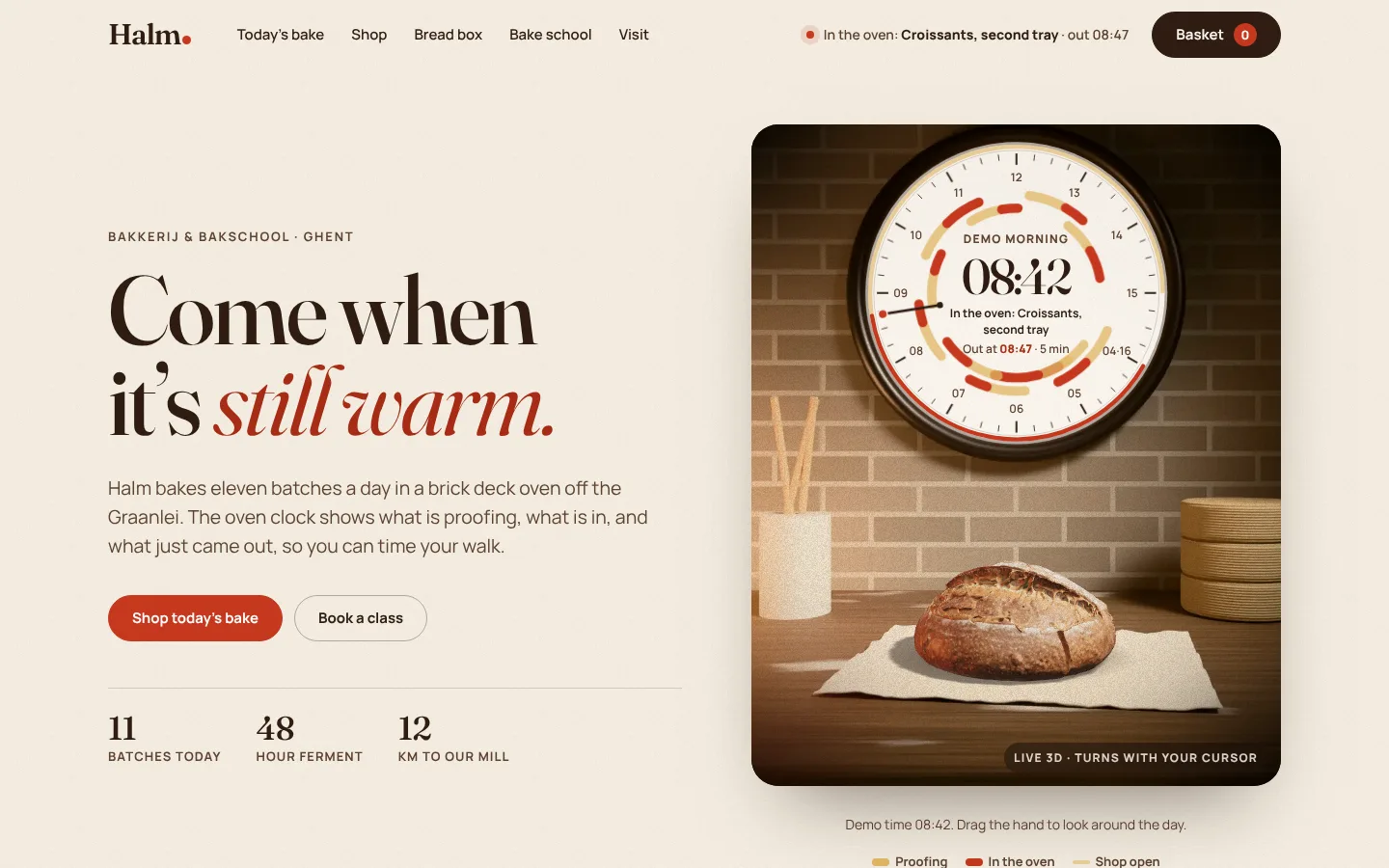
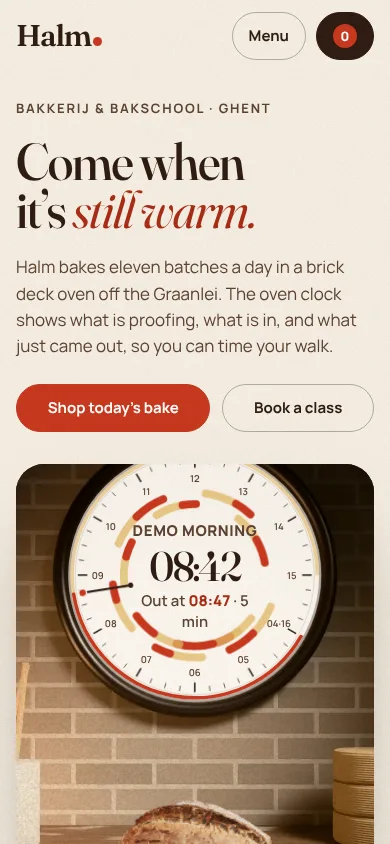
Halm is a full landing page for a fictional sourdough bakery and bake school in Ghent, and every part of it is drawn: cream flour-paper, crust-brown ink, one tomato-red accent and a fine print grain, with breads as SVG illustrations instead of photos. Fraunces headings switch to a tomato italic for the second half of each line, and Manrope keeps menus and forms readable. The signature is an oven clock in the hero: a dial mapping the baker's day from 04:00 to 16:00, with each batch shown as a proofing arc followed by a baking arc. It tells a visitor what is in the oven right now, which is the main reason anyone checks a bakery's site in the morning.
After oven doors swing open, the hero shows the headline beside a brick oven arch with the clock inside it, set to live Ghent time or a demo morning. Dragging the hand scrubs the day and updates the oven sheet below, the Next tray line on each shop card and a ticker. Further down are a filterable shop with a basket and pickup reservation, a bread-box builder that fills a crate and prices it live, a two-month class calendar with seat counts, and an illustrated neighbourhood map with walking routes and opening hours.
Good for
- Bakeries and coffee roasters: the clock shows bake or roast times as they happen
- Pizza and food trucks: the prompt suggests a pizza oven with short bakes
- Cookery and craft schools: the class calendar handles seats and waitlists
- Subscription food boxes: the crate builder prices a recurring order live
- Neighbourhood shops: the drawn map and live hours help people visit
How Halm is built
- Oven clock as a slider. A 600×600 SVG dial maps 04:00 to 16:00 onto one turn of a 12-hour face (angle = minutes/2 degrees). Eleven batches are drawn as wheat proofing arcs and tomato baking arcs on two lanes at r 190 and 164, and the hand can be dragged or moved with the arrow keys in 5-minute steps.
- One clock driving the whole page. The dial's time sets every batch status (Later, Proofing, In the oven, Still warm, On the shelf), the oven sheet progress bars, the 'Next tray' line on each shop card, the header chip and the ticker text.
- Live Ghent time with a demo fallback. Intl.DateTimeFormat reads Europe/Brussels time; outside 04:00–16:00 or on Mondays the page switches to a demo time of 08:42, and ?t=HH:MM forces any time for screenshots.
- Oven-door preloader. Two brick doors swing open with rotateY(∓104deg) under perspective 1600px over 1s after a 00 → 48 'hours proofing' counter, with a CSS safety animation that removes it after 6s even if JS fails.
- Procedural SVG bread sprite. Eight bread illustrations are generated as <symbol>s from gradients, a 7px halftone dot pattern and a seeded Park–Miller scatter (seed 7), then reused with <use> in the oven, sheet, cards, basket and crate.
Images, video and 3D
The prompt needs no image files: every loaf, the oven, the crate and the neighbourhood map are drawn in SVG by the code. The live demo goes further with product photos and a GLB loaf composited onto a Blender render; if you want that, photograph or AI-generate your products in one consistent side light and convert a hero product to GLB with an image-to-3D tool.
Build it with Claude
Paste the prompt and ask Claude for one index.html; with no images or libraries the preview can show the full page. Drag the clock hand and check that the oven sheet statuses, the shop cards' 'Next tray' lines and the header chip all change together, and add ?t=11:00 only once you run the file yourself, since the preview URL cannot take parameters.
Claude guide →Build it with Claude Code
A single index.html is enough here, so no assets folder or server is required unless you add your own photos. Ask Claude Code to load the page with ?t=08:42 and ?t=15:30 in a headless browser, confirm the batch statuses and ticker match those times, and check the basket reservation, bread-box 8-item cap and class booking flows at 390 and 1440.
Claude Code guide →Build it with ChatGPT
The file is about 100 KB, so ask ChatGPT for it in parts (data arrays and tokens, the oven and dial, the shop and basket, the box, school and map) or in canvas, then join them. The clock maths usually needs a follow-up: check that the pointer-to-minutes conversion handles the 4-o'clock wrap (h < 4 means add 12) and that arcs over 180° set the large-arc flag.
ChatGPT guide →If it doesn’t work
- The page always shows demo mode: the live check must read Europe/Brussels time through Intl formatToParts, not the visitor's local clock, and Mondays are closed by design.
- Batch arcs collide on the dial: a batch moves to the inner lane only when it would overlap the previous one, so compute lanes in order rather than alternating.
- The preloader blocks the page when fonts are slow: wait for document.fonts.ready for at most 600ms and keep the 6s CSS fallback so the doors always open.
Questions about Halm
Does the Halm bakery page need any images?
Not as specified in the prompt. All eight breads, the brick oven, the crate and the map are SVG built by the script, and the only remote request is Google Fonts. You can swap the art tiles for real product photos if you have them.
Can I change the oven day to my own opening hours?
Yes. The day window is set by DAY0 and DAY1 (04:00 to 16:00 here), and the batches carry in and out times in minutes. Keep 8 to 12 batches so the two rings stay readable.
Make it yours
This prompt rebuilds one exact design. If everyone ships it unchanged, the sites will look alike. Before you paste it, change these lines so the result is yours. Each change is one edit to the prompt; the structure and the interactions stay intact.
- Brand and offer. Swap Halm, Ghent and the eight products for your own business, city and menu. Keep 6–9 products with one featured (2-column) item so the grid stays balanced, and keep 8–12 batches so the dial rings stay readable.
- Re-theme the oven clock. The dial over a working schedule is the signature; keep the arc lanes, the scrubbing hand and the linked statuses, but change what frames it and what the arcs mean: a coffee roaster's drum window with roast/cool arcs, a brewery's kettle porthole with mash/boil arcs, a pizza oven's mouth with 90-second bakes on a 1-hour face, a florist's cold-room door with delivery/arranging arcs, or a ramen counter with broth/noodle times. Change the day window (
DAY0/DAY1) to your opening hours. - Palette. Replace flour, crust and tomato with your three brand colours (ground, ink, one accent) and recolour the bread gradients to match your product. Keep muted text ≥ 4.5:1 on the ground and white-on-accent ≥ 4.5:1 (darken the accent if needed).
- Type pairing. Swap Fraunces + Manrope for another expressive serif with a variable italic (for example Newsreader, Gloock, or Young Serif with an italic partner) and a plain sans you haven't seen on your last three sites. Keep the "roman line / italic accent" heading pattern.
- The hero object and the set. Replace
loaf.glbwith your own signature product: make a clean 3/4 product shot on light grey, run image-to-3D, and optimise to ≤ 1.5 MB. Re-render the plate with your own surface and wall (a marble café counter with a tiled wall, a steel brewhouse bench, a florist's zinc table). Keep the same camera numbers so the live model still lands on the surface, and re-project the bezel so the dial still sits in it. Reshoot the product photos with one lens, one light direction and one grade. - Bread box → your subscription. Rename the crate and its 8 slots to your own container (a coffee tin with 4 bags, a flower bucket with 6 stems, a wine case with 6 bottles), set your own min/max and discounts, and keep the live receipt and count-up.
- School and map. Replace the class types, colours and dates with your own events, and redraw the map's water, streets, park and pins around your real neighbourhood (draw it, don't trace a real map).
- Copy. Rewrite every headline and note in your own voice, and keep it concrete ("out at 08:47", "eight items is the most we can fit") rather than generic.
Tell your AI: "Build exactly as specified, but with these changes: …", then list your edits.