Site · Landing page
Quire Fintech landing with a drag-and-drop cash-flow simulator
Drag invoices onto a 12-week timeline and watch your balance redraw. Fee calculator, pricing and a scroll-driven how-it-works.
What's in the prompt
- A full written spec: layout, tokens, every animation with its numbers, responsive rules
- The complete working code as the reference implementation
- Accessibility, reduced motion and fallbacks already handled
- A “Make it yours” checklist so your site looks like nobody else’s
- Type
- Site
- Built with
- HTML, CSS, JS · three.js 0.160.0
- Prompt size
- 125 KB
- Tags
- fintech, saas landing page, calculator, data viz
- Updated
- 2026-11-26
Use it in three steps
- Copy the prompt with the button above.
- Paste it into your AI (Claude, Claude Code, ChatGPT, Cursor…) and add your edits.
- Launch the single
index.htmlanywhere: Cloudflare Pages, Netlify, GitHub Pages.
About the Quire design
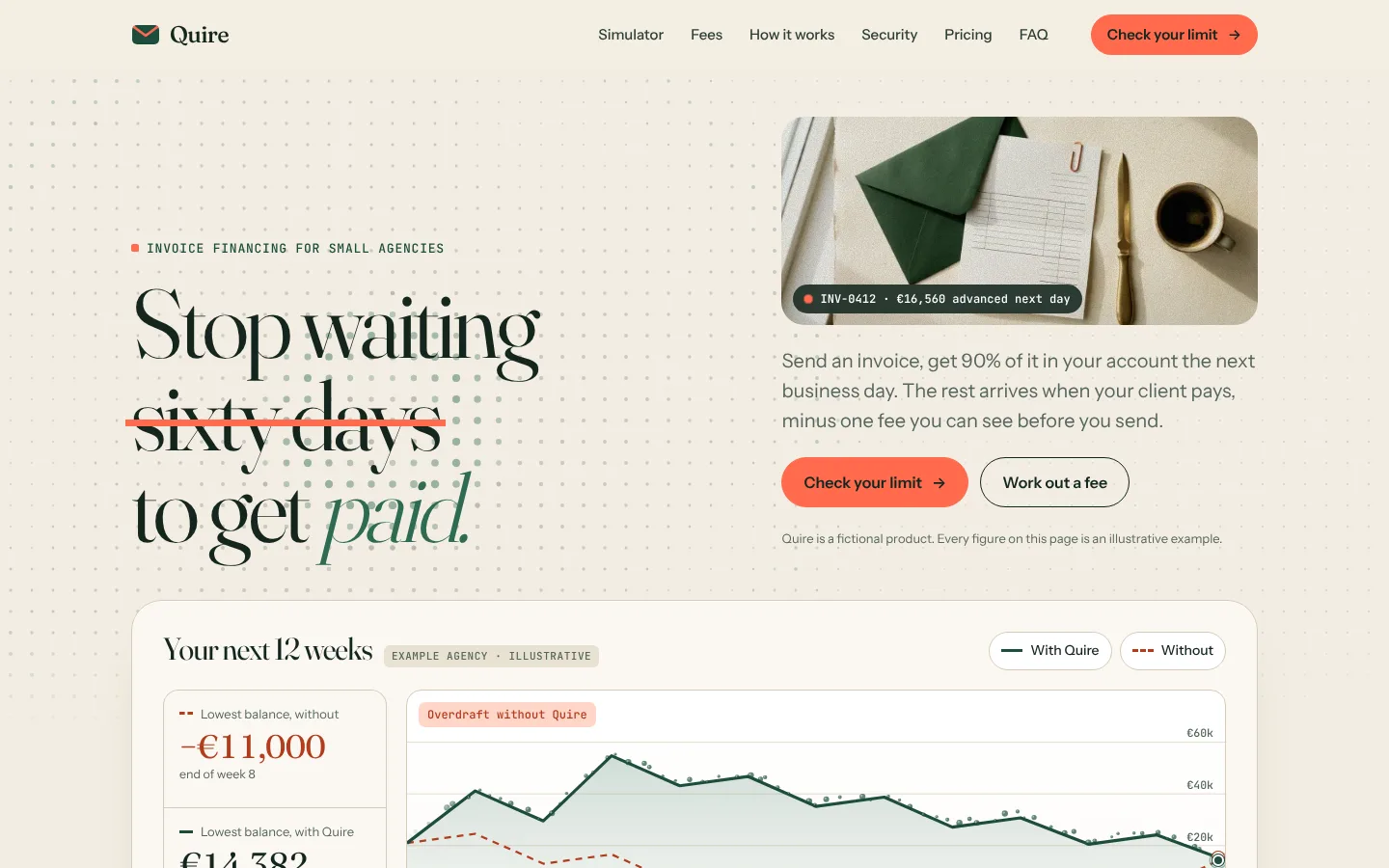
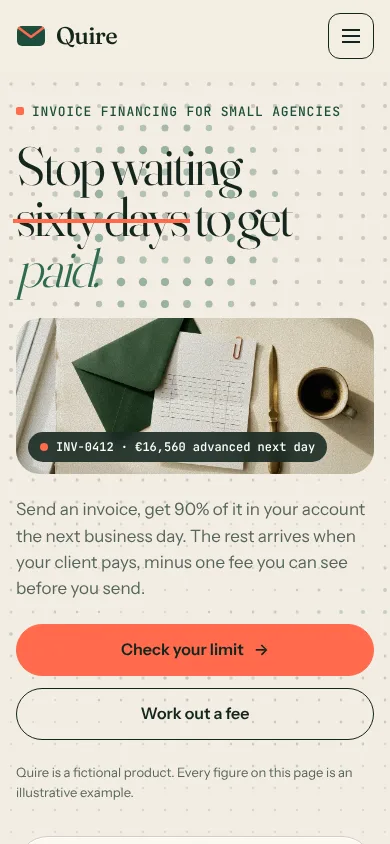
Quire is a landing page for a fictional invoice-financing product for small creative agencies. It avoids the usual dark fintech look: cream paper with a faint dot grid, deep green ink and one coral accent, used for fills while a darker coral handles text. Fraunces sets the headline, with "sixty days" struck through in coral; Instrument Sans runs the interface and JetBrains Mono the figures and formula. The signature is a 12-week cash-flow simulator in the hero, because the real question for an agency owner is whether payroll will clear before a client pays, and the chart answers it directly.
A visitor sees the headline over a halftone field that sends slow pulses out from behind it and reacts to the cursor. In the simulator they drag four invoice chips onto a timeline and watch two balance lines redraw live: a dashed line without financing that dips into an overdraft zone, and a solid line with it. Odometer stats show the lowest balances, weeks overdrawn and fees. Below come a fee calculator that prints its formula, a scroll-scrubbed How it works where a 3D paper invoice is stamped, folded into an envelope and sent to a bank card, a security block, pricing, an FAQ and an application form.
Good for
- Fintech and lending products: the simulator shows the cash gap the product closes
- Accounting and invoicing tools: draggable invoices make due dates concrete
- Payroll or rent-smoothing services: the prompt suggests payroll runs as the dragged items
- Ad-spend or e-commerce financing: bursts that pay back later fit the lane
- B2B products with a pricing formula: the calculator shows its working
How Quire is built
- Drag-to-schedule cash-flow simulator. Four invoice chips drag onto a 12-week lane; while dragging, one simulate() function recomputes both balance lines (start €21,000, payroll €15,200 on even weeks, 90% advance) and the SVG chart tweens over 300ms.
- Odometer stats. Lowest balance with and without, weeks overdrawn and fees roll digit by digit, each digit a 0–9 column moved with translateY(−d × 1.1em) over 1s with a 30–40ms stagger.
- Halftone hero field. A 22px dot grid on canvas swells with a slow wave, two pulse rings every 3.2s from behind the headline, a 28-point cursor trail lens and click ripples, batched into Path2D buckets and capped near 33fps.
- Cash particles on the chart. Seventy coin particles ride the tweened With-Quire line, part around the cursor within 80px, and burst up from the week an invoice is advanced; coral drips fall wherever the Without line is below €0.
- Scroll-scrubbed 3D tri-fold. A 460vh sticky track drives a three.js invoice whose vertices are refolded every frame around creases at z = ±.55, stamped, sealed into an envelope and flown along a CubicBezierCurve3 raycast from the dashed SVG path into a bank card.
Images, video and 3D
Two photos only: desk.webp (an overhead still life with a green envelope and invoice) and envelope.webp (a sealed envelope with a coral sticker), graded together with grain. The invoice and envelope in the 3D fold are canvas textures drawn in code. Replace the photos with your own still lifes or AI-generated ones in soft daylight, with no readable text or logos.
Build it with Claude
Ask Claude for the whole index.html. The simulator, fee calculator and CSS fold work without three.js, so the preview is useful even if the module does not load: drag Northfold Labs to a later week and watch weeks overdrawn change, and check the fee formula reads €18,400 × 0.040% × 67 days = €493.12 by default.
Claude guide →Build it with Claude Code
Make a folder with index.html and assets/desk.webp and assets/envelope.webp, then serve it with npx serve so the three.js module loads as it will online. Ask Claude Code to verify the default chart dips below €0 without Quire, that keyboard ←/→ and Delete work on placed bars, and that blocking the CDN leaves the CSS 3D fold running from the same scroll progress.
Build it with ChatGPT
Ask ChatGPT to deliver the simulator and chart, the fee calculator, the How it works fold and the remaining sections as separate parts, or in canvas, since the prompt is long. Check in a follow-up that the chart, lane, tray, stats and data table all render from the single INV array and simulate() function, so the numbers never disagree.
ChatGPT guide →If it doesn’t work
- The default chart never goes into overdraft, so the story falls flat: keep START, IN, OUT and PAYROLL at 21,000 / 7,200 / 3,600 / 15,200 with invoices 0412 and 0419 preplaced, or retune them until Without dips below zero.
- Fees disagree between the simulator and the calculator: use the same min(4% of amount, max(€25, amount × rate × days)) function in both, with Flex at .040% per day.
- Touch-dragging a chip blocks page scrolling: set touch-action: none only on chips and bars, not on the lane or card, so swipes elsewhere still scroll.
Questions about Quire
Is Quire a real financing product?
No. Quire is fictional and the page labels every rate, plan price and example figure as illustrative. The form shows an example limit and says nothing was sent.
Can someone use the simulator without dragging?
Yes. Clicking a chip schedules it at its default week, placed bars move with the arrow keys, Home and End jump to weeks 1 and 12, and Delete removes them. A table of the weekly numbers sits in a details element under the chart.
Make it yours
This prompt rebuilds one exact design. If everyone ships it unchanged, the sites will look alike. Before you paste it, change these lines so the result is yours. Each change is one edit to the prompt; the structure and the interactions stay intact.
- Brand and offer. Swap "Quire" and invoice financing for your own cash-flow product: subscription revenue advances, payroll smoothing, supplier early-pay, rent bridging. Keep the four-figure stat row, three plans and six FAQs so the grid stays balanced.
- The ambient layer. Re-theme the hero halftone's pulse as your product's heartbeat (sonar rings for monitoring, ink drops for a writing tool, coins for payments), and make the chart particles your unit of value (parcels, kilowatts, minutes). Keep the cursor lens, the click ripple and the off-screen pause.
- The simulator's cargo. The draggable invoice chips are the signature. Re-theme what gets dragged and what the bar means: purchase orders that span to the supplier's due date, payroll runs, ad-spend bursts that pay back weeks later, rent days. Keep 4 items, one lane row each, a bar that spans the waiting period and the live redraw while dragging. Retune
START,IN,OUTandPAYROLLso the "Without" line dips below zero by default. - The 3D fold sequence. Replace the three.js invoice → envelope → bank card with your own object's journey (redraw the canvas texture; keep the crease-fold vertex function, the raycast path and the soft shadow): a purchase order stamped and boxed into a parcel, a receipt rolled into a tube, a contract signed and sealed with wax. Keep the 4 scroll keyframe bands and the odometer landing.
- Palette. Replace paper
#f3ede2, green#1d4d3cand coral#ff6a4dwith your own ground, ink and single accent (for example oat + navy + saffron, or grey-white + aubergine + lime). Keep the muted text and the accent-as-text colour at ≥ 4.5:1 on the ground, and use the bright accent only for fills. - Type pairing. Swap Fraunces + Instrument Sans + JetBrains Mono for another high-contrast display serif or grotesk, with a neutral sans and a mono for figures (for example Newsreader + Geist + Geist Mono). Keep tabular figures in the odometers.
- Photos. Replace
assets/desk.webpandassets/envelope.webpwith two still lifes of your own product's world, in the same overhead or three-quarter soft-daylight style, shot in your palette, with no readable text or logos. Export as .webp under 250 KB. - Copy and numbers. Rewrite the headline's struck-through phrase for your audience's pain ("~~net 90~~", "~~month-end panic~~") and every rate, plan price and example figure. Keep every number labelled illustrative unless it is real.
Tell your AI: "Build exactly as specified, but with these changes: …", then list your edits.