Site · Scroll storytelling
Tern Orbital Scroll-flown rocket launch showreel
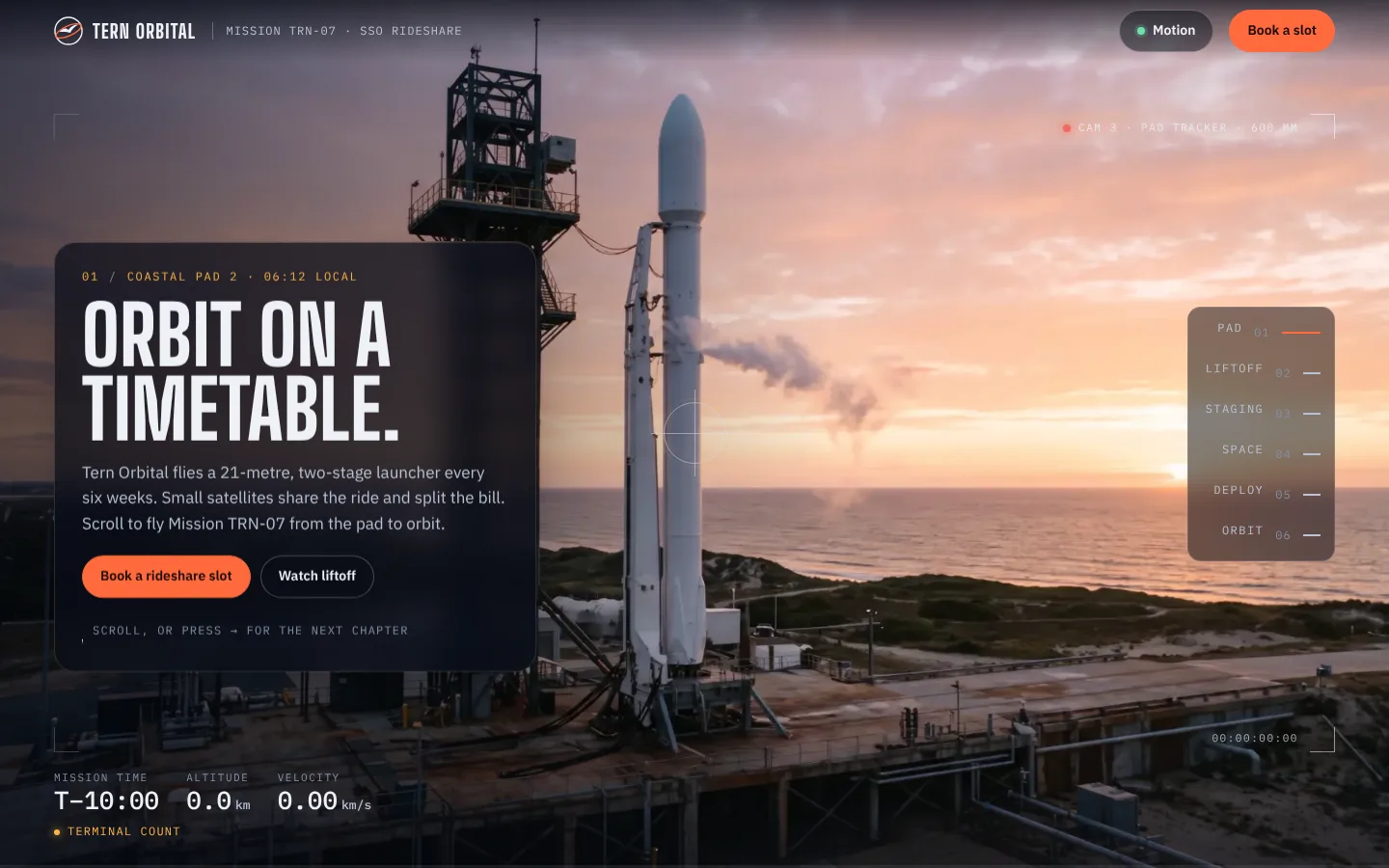
Scroll flies a mission from pad to orbit with a live HUD, then ends on a working rideshare booking tool.
What's in the prompt
- A full written spec: layout, tokens, every animation with its numbers, responsive rules
- The complete working code as the reference implementation
- Accessibility, reduced motion and fallbacks already handled
- A “Make it yours” checklist so your site looks like nobody else’s
- Type
- Site
- Built with
- HTML, CSS, JS · three.js 0.170.0
- Prompt size
- 123 KB
- Tags
- scroll storytelling, three.js, space, booking
- Updated
- 2026-11-26
Use it in three steps
- Copy the prompt with the button above.
- Paste it into your AI (Claude, Claude Code, ChatGPT, Cursor…) and add your edits.
- Launch the single
index.htmlanywhere: Cloudflare Pages, Netlify, GitHub Pages.
About the Tern Orbital design
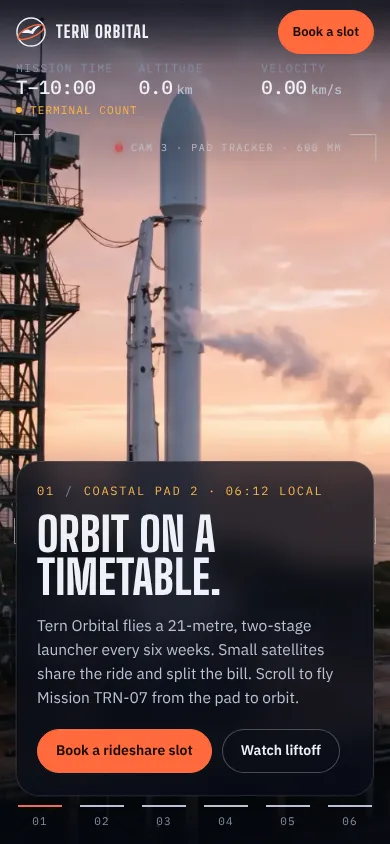
Tern Orbital is a scroll-driven showreel for a fictional small-satellite launch company, flying Mission TRN-07 from a coastal pad at dawn to a 525 km orbit and ending on a working rideshare booking tool. The palette is deep night blue with a flame orange for calls to action and a warmer gold for status text. Big Shoulders Display in condensed capitals gives it the feel of launch signage, with IBM Plex Sans for copy and IBM Plex Mono for the live mission readouts. The signature is that the launch is the product story: a buyer watches the kind of ride their satellite would take before choosing a slot.
A launch-poll preloader ticks Range, Weather and Vehicle to GO. The first two chapters are real-looking launch footage scrubbed by scroll under a camera viewfinder, while a HUD counts mission time, altitude and velocity. Around the cloud deck the film dissolves into a live 3D scene: stage one separates and tumbles away, the fairing opens over a night-side planet with city lights, four satellites deploy and unfold their panels, and the camera pulls back as an orange orbit line is drawn. A chapter nav lets visitors jump around, and the booking section prices a payload by mass, orbit and launch window on a 12-port dispenser ring.
Good for
- Aerospace and launch startups: the mission profile explains the service in order
- Logistics and freight: the prompt suggests a container ship crossing a storm
- Expedition or tourism operators: a balloon flight or dive can be the journey
- Hardware product launches: the clipped GLB shows how a product comes apart
- Any booking with limited slots: the port ring handles taken and too-small slots
How Tern Orbital is built
- Scroll-scrubbed launch film. A 10 s all-intra H.264 clip is mapped to scroll for s 0 to 1.7, keeping only one seek in flight and re-seeking on 'seeked' when the gap exceeds 1/48 s, then it cross-fades into WebGL between s 1.5 and 1.85.
- One scroll value drives everything. A single s from 0 to 6 across 810vh sets camera keyframes, the sky shader altitude, engine thrust, staging and the HUD, which interpolates a 14-row table of mission time, altitude and velocity.
- GLB split with clipping planes. The rocket GLB is cloned four times with local clipping planes so stage 1 (y < 6.0), stage 2 (6.0–8.25) and two fairing halves (y > 8.25, x > 0 or x < 0) separate and hinge open.
- Baked planet and GPU constellation. The planet's continents, clouds and city lights are baked once into two 1024×512 equirect targets, and 12,000 satellites orbit in one Points draw with Kepler-like speed (r₀/r)^1.5 in the vertex shader.
- HDR-only bloom and grade. UnrealBloomPass at strength .42 with threshold 1.0 blooms only HDR flame, sun and city lights, followed by a grade pass with chromatic aberration, a soft S-curve, vignette and grain.
Images, video and 3D
A 10 s dawn launch clip at 1920×1080 plus a 720×1280 portrait crop (made with an image-to-video tool from a pad still), its first frame as the poster, a 680 KB meshopt rocket GLB from an image-to-3D tool, a Blender Cycles pad plate and two fallback stills, plus a mission patch. To make your own, generate one continuous camera move from a still of your vehicle, re-encode it all-intra with the ffmpeg command in the prompt, and convert a product render to GLB.
Build it with Claude
Ask Claude for the full index.html, knowing the preview cannot reach your local MP4 and GLB, so it will show the procedural stand-in rocket or the CSS fallback sky. Use it to check the chapter nav, the → and ← chapter keys, the HUD values at each chapter and the booking maths (ride minimum $30,000, ESPA port above 24 kg), then run the real files locally.
Claude guide →Build it with Claude Code
Put launch-1080.mp4, launch-720.mp4, launch-poster.webp, rocket.glb, pad-plate.webp, ch-liftoff.webp, ch-staging.webp and patch.webp in assets/, and serve with python3 -m http.server; video seeking and GLB loading need http. Ask Claude Code to scroll through s = 0 to 6 headlessly, confirm the film-to-WebGL handoff has no blank frame, and test that a taken port or a too-heavy CubeSat payload clears the selection with an explanation.
Build it with ChatGPT
This is the longest prompt in the set, so ask ChatGPT to build it in stages: the classic script (scroll model, HUD, booking) first, then the three.js module in pieces, using canvas if available. The opening paragraph says everything is procedural while the Assets section lists a film and GLB, so tell it explicitly to load the assets with the procedural rocket as the fallback.
ChatGPT guide →If it doesn’t work
- Scrubbing the film stutters or lags behind the scroll: encode it all-intra (-g 1) with +faststart, and never queue more than one seek at a time.
- The fairing halves or stages render with gaps or show through each other: enable renderer.localClippingEnabled, use cloned DoubleSide materials and re-apply the clip planes from the wrapper's world matrix every frame.
- The page feels endless on phones: keep the clickable chapter nav as a bottom bar and the keyboard jumps, and leave the scrollbar visible.
Questions about Tern Orbital
Why is the Tern Orbital page about 9 MB?
Most of it is the all-intra launch film (7.5 MB at 1080p), which is encoded with a keyframe on every frame so scroll seeking is instant. Phones get a 4 MB 720×1280 crop instead.
What happens if three.js fails to load?
The launch film still scrubs because it is plain HTML video. After that, a CSS gradient sky, stars, a planet limb and an SVG rocket take over, and the HUD, chapter nav and booking tool keep working.
Make it yours
This prompt rebuilds one exact design. If everyone ships it unchanged, the sites will look alike. Before you paste it, change these lines so the result is yours. Each change is one edit to the prompt; the structure and the interactions stay intact.
- Brand and offer. Swap "Tern Orbital", Mission TRN-07 and the rideshare booking tool for your own journey-shaped product: a cargo airline, a deep-sea survey, a balloon-tourism flight, a courier network. Keep six chapters, the HUD with three live numbers and one booking tool at the end with live pricing.
- The journey. (Keep the preloader, bloom, cursor spring and constellation layer; re-skin them to fit.) The scroll-flown mission is the signature. Re-theme it as another trip with clear stages: a submarine descending through sunlit → twilight → midnight zones to a hydrothermal vent, a weather balloon rising to burst and parachute, or a container ship leaving port, crossing a storm and docking. Keep one
svalue driving camera keyframes, a shader backdrop that changes with "altitude" (depth, distance), a stage-separation moment and a pull-back reveal at the end. - HUD numbers. Replace Mission time, Altitude and Velocity with the three numbers your journey actually has (depth / pressure / water temperature, or distance / ETA / fuel). Rewrite the profile table so they rise realistically.
- Palette. Replace
--night,--flame,--flame-2and the dawn sky stops with your brand colours. Keep--ink-2at ≥ 4.5:1 on--panel, and keep copy on glass cards, never on the raw backdrop. - Type pairing. Swap Big Shoulders Display + IBM Plex for another condensed or industrial display face with a technical mono (for example Anton + JetBrains Mono, or Oswald + Space Mono). Keep the mono for every live number.
- The final picker. Replace the 12-port dispenser ring with the slot object of your world: berths around a dock, seats in a capsule, pallet positions in a hold. Keep the disabled-when-taken rule, the size constraint (like CubeSat vs ESPA) and the hold confirmation.
- Film and models. Generate your own one-take hero clip from a still of your vehicle or venue (keep it to one continuous camera move, all-intra encoded) and your own GLB from a product render. Keep the split-by-clipping trick for any vehicle that comes apart.
- Copy. Rewrite every eyebrow, headline and fact pill with real specifics from your operation ("40 s spacing", not "seamless deployment").
Tell your AI: "Build exactly as specified, but with these changes: …", then list your edits.